
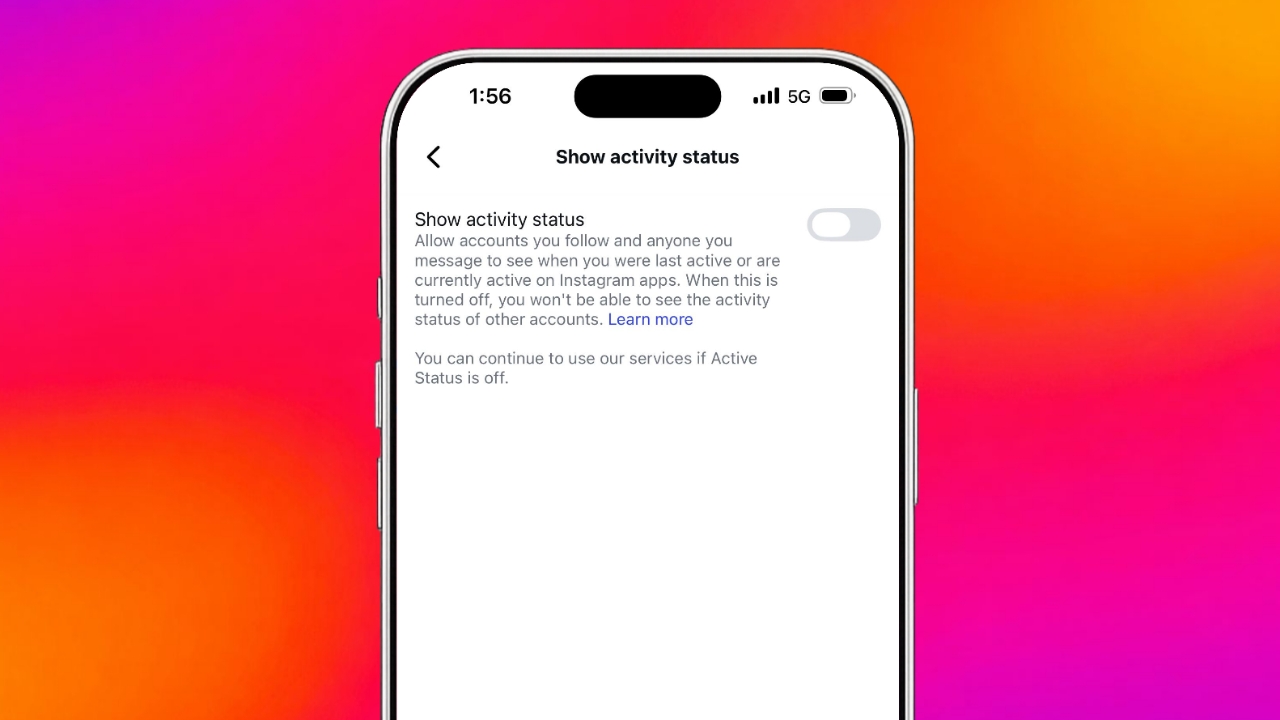

Many users dislike showing online availability publicly. Active Status feature reveals current and recent activity.
Thankfully, Instagram allows users to Turn it Off.
- Hide your online presence from followers.
- Stop showing your recent activity time.
- Gain more control over Instagram privacy.
Instagram’s Active Status Mode: Understanding Activity Status
Instagram includes Activity Status as a default feature. This feature displays your online visibility status. A green dot appears during active sessions. It tells others that you are online.
Instagram also shows your recent activity time. Users can see when you last visited. This works similarly to other Meta platforms. Facebook, Messenger, and WhatsApp offer similar features.
Many people find this feature inconvenient sometimes. Friends may expect quick replies after messaging. Delayed responses can create awkward situations online. Some users simply prefer browsing privately.
Many users visit Instagram for content only. They enjoy photos without messaging distractions daily. Activity Status may feel unnecessary for them. Privacy-conscious users often choose disabling this feature.
Instagram makes Activity Status an opt-out feature. This means users must disable it manually. Fortunately, changing this setting remains very simple. A few steps restore additional privacy control.
Mobile App Steps
Instagram follows a similar design across devices. Android and iPhone users follow matching instructions.
Follow these steps to disable Activity Status:
- Open the Instagram application first.
- Visit your profile page directly.
- Tap the three-line menu icon.
- Open Settings and Activity section.
- Some versions show Settings and Privacy.
- Scroll to interaction-related account settings.
- Select Messages and story replies option.
- Find the online visibility section.
- Tap Show activity status setting.
- Turn the toggle switch off.
- Ensure the toggle becomes grey afterward.
Older Instagram versions may look slightly different. However, the process remains very similar overall. The setting location may change slightly. The feature itself works exactly the same.
Once disabled, your activity becomes invisible. Others cannot see your online status. They also cannot view recent activity information.
Desktop and Privacy Benefits
Desktop users can also disable this feature. First, log into your Instagram account. Open your profile from the homepage. Click the settings icon available there.
Choose Settings and Privacy from options. Locate Messages and story replies section. Open Show activity status settings page. Turn the visibility toggle off completely.
This setting provides several useful privacy benefits:
- Browse Instagram without appearing online.
- Avoid pressure for immediate message responses.
- Reduce interruptions during busy schedules.
- Enjoy content without social expectations.
- Maintain greater control over personal visibility.
The feature can remain disabled permanently. Users can also enable it anytime. Simply revisit the same settings page. Turn the toggle back on later.
One important limitation exists after disabling. You lose visibility of others’ activity too. You cannot see when friends appear online. Their recent activity information becomes hidden.
This works much like WhatsApp’s visibility settings. Privacy remains balanced between all users. Instagram applies the same approach consistently.
The End Note
Killing Active Status mode on Instagram takes only a few minutes. Once disabled, visibility information stays hidden.
This simple setting creates a calmer experience.
